
Ground control for everything you have to do
A local-first task manager that's private by design, not by promise — your data stays on your device, and sync runs through storage you choose. We never get a copy.
Desktop app arriving soon.
- macOS
- Windows
- Linux
- iOS
- Android
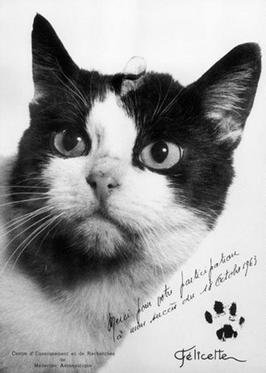
- Sujet
- Félicette — chat, Paris
- Lancement
- 18 Oct 1963 · Hammaguir
- Véhicule
- Véronique AGI n° 47
- Apogée
- 157 km
- Récupération
- en parfaite santé
Somebody should remember
Everyone knows Laika. Almost nobody knows Félicette — a little Parisian cat who went to space in 1963, came back, and then waited fifty-six years for a statue.
Which is roughly what happens to the small things you meant to do. They are not hard. They are just easy to forget, and nothing is holding on to them.
Todebaran holds on to them. The name is your to‑dos plus Aldebaran, the star she is still headed for, one finished task at a time.
Catch it, place it, finish it
Capture whatever lands on you, put it where it belongs, plan the week around it — and then close the door and do the work.
Before it wanders off
The thought you have to switch windows for is the thought you lose. So the capture card comes to you — not a title box, but the whole task editor in miniature.
- A system-wide shortcut, so you never switch windows to write something down
- A note, subtasks, tags and a date, without leaving the card
- A date picker you can type into, instead of hunting through a calendar
A place for all of it
Areas hold projects, projects hold headings, headings hold tasks, and tasks hold subtasks. Anything meant for reading rather than doing goes into a collection instead.
- Areas, projects, headings and collections
- Tag a project once and every task inside it answers to that tag
- Pick anything up and move it — whole sections included
Today is today
When you will start something and when it is actually due are two different questions, so they are two different fields. Everything else waits in Upcoming — or in Someday, which is allowed.
- Today, Tomorrow, Upcoming and Someday
- Smart lists that build themselves from rules you write once
- Your Apple Calendar events, sitting beside your tasks
Radio silence
Focus mode puts the timer inside the task you are working on, so the session and the work are never in two different places. Minimize it and a small pill keeps counting, wherever you left it.
- A pomodoro or an open stopwatch, tracked per task
- Sessions survive a restart — time runs against a real clock
- Every minute you spend is something a smart list can filter on
It doesn't stay on one machine
Turn on sync and your tasks, notes and files land on every device you use. Share a space and other people can plan in it beside you.
Every device in step
Tasks, projects, notes and the files you dropped in, all on whichever machine you sit down at. Add as many as you use.
A space you share
A named space of projects everybody in it can see and work on. A household, a study group, or two people planning one trip.
A library, not a paperclip
Drag a file in, or paste a screenshot straight into a note. Images sit in the note itself, everything else as a link — and all of it files away in folders of your own.
A day you can hold
A slip is a small template you build by wiring blocks together on a canvas. Resolve it and it prints, saves as an image — or actually goes and does the thing.
Print it
Send your day, a single task or a whole list to a thermal printer. A screen is where tasks go to hide; paper is stubborn in a way pixels are not.
Export it
No printer, no problem. Resolve a slip to an image and keep it, send it, or put it anywhere a picture goes.
Run it
A block can fetch a page, call your model or run a script. Attach a slip to a task and set it to run on completion, and ticking something off becomes doing it.
Made to be lived in
An app you spend all day in should bend to how you work — and should feel like something under your hands, not nothing.
Themes, and then some
A shelf of built-in themes, a long palette of hand-picked accents, or an exact hex of your own. Build a whole theme from scratch and export it as a file — to keep, or to pass to someone else. Pick one look for light and another for dark, and the app changes with the hour.
Your own wallpaper
Put an image behind almost any view — blur it, fade it, let it drift as you scroll. Projects inherit their folder's image unless you say otherwise.
Zen mode
Just what you are writing. Everything else steps back.
A quiet end to a loud week.
Every shortcut, yours
Every action has a key, and all of them can be changed. Tags get single keys too.
Pick it up and move it
Drag anything anywhere — a task onto a day, a whole heading and everything under it. Swipe a row on the trackpad and it answers with a real haptic tap.
Colour-coded, everywhere
Colours on projects, tags and countdowns — even on individual sidebar rows. Or let the whole accent follow the folder you are in.
Another window, another view
Open another window on another list, with its own sidebar state. Quit with several of them open and they all come back, in the order you were using them.
And plenty more on board
The small things you only notice once you have lived in a task manager for a while.
Countdowns
A launch, a trip, a deadline you want to feel approaching.
Day headings
Morning, Afternoon, Evening, or names of your own — sections you cut a single day into.
A daily journal
One note per day, kept with that day forever.
Deadlines
The flag sets a due date, not a priority. There are no priority flags here.
Recurrence
Six kinds, including “three days after I finish it” — and only ever one live copy.
Search
⌘K finds any task, project or note — and doubles as how you get around.
Tags
Nested, coloured, and each one can carry its own single key.
Rich notes
Tables, callouts, embeds — and Markdown in and back out.
Subtasks
Break a big thing into small ones and watch the ring fill.
Logbook & trash
Everything you have finished, and thirty days of second chances.
AI chat
Talk to your list inside the app, on your own key.
Tray & badges
A tray icon with a live count, and a progress bar while a slip prints.
A sidebar you arrange
Reorder the sections, and hide the ones you never open.
Import & export
Markdown into collections; themes, shortcuts and slips back out as files.
Printers, plural
Network, USB or serial — keep as many as you use and pick a default.
Nothing leaves without you
Todebaran runs on your device and keeps your data there. Turn on sync and it travels through storage you picked, on a route with no server of ours anywhere in it.
Works offline
Everything lives on your device. No connection to open the app, and no account needed to use it.
Sync you control
A shared folder, a WebDAV server or an S3 bucket — whichever you already have. Changes merge field by field.
Bring your own AI
OpenAI, Anthropic, Google — or a model running on your own machine. Your key never enters sync and never reaches us.
Shared, and still private
A space carries the projects you file under it and nothing else. Your own areas, your day plan and your focus time are not in it.
In your hands, or in theirs
The right-hand column is not one product. It is how the category works, and it is the trade nearly every task manager asks you to make.
| Todebaran | A typical cloud | |
|---|---|---|
| Where your data lives | On your own disk | On their servers |
| What you can attach | Whatever your storage holds | A quota from the plan |
| Whether you sign up | Not needed to use the app | Required before anything |
| How automation runs | MCP and deep links, locally | Their API, on their servers |
| If the service ends | Your files are already here | An export, and then nothing |
The right-hand column is not worse software. It is what the same software looks like when it lives somewhere else.
No hidden claws
The whole app is free to use. Pro lifts the limits and adds sync, custom themes and shared spaces.
Free
Everything you need to get organized.
No account needed.
What you get- Tasks, projects & collections
- Calendar & smart lists
- Focus mode with a built-in pomodoro
- Slips & thermal printing
- A range of light & dark themes
Pro
For everything, everywhere, without limits.
€30.00 billed yearly
Pro subscriptions arriving soon.
Everything in Free, plus- Sync across your devices
- Shared spaces with family or friends
- Unlimited areas
- Unlimited projects, collections & smart lists
- Custom themes
Pro is what pays for Todebaran. No investors, no ads, nothing sold on the side. Todebaran answers to the people using it and to nobody else.
On the launch track
Todebaran is on its way to every device. Here is what has shipped, what is next, and what we are building.
macOS
Available nowDownload it now, straight from the website.
Mac App Store
Coming soonThe same app, one tap from Apple — coming soon.
Windows & Linux
In final testingBoth builds are done, and launching very soon.
iOS & Android
In developmentIn active development, so your tasks travel with you.
Last shipped 15 August 2026. See what changed
Nothing but stars out here
“I sat on the keyboard for forty minutes and it did not lose a single task. Robust.”
“Focus mode gives my human twenty-five minutes of uninterrupted attention. None of it is aimed at me. Four stars. Fine — five.”
“It prints. On paper. That moves. I have no further notes.”
Any resemblance is purely coincidental.
Start your countdown
Put tomorrow in it. Then the day after. Then stop noticing you are doing it. If it does not stick, there is nothing to cancel and nothing left behind.
Desktop app arriving soon.
- macOS
- Windows
- Linux
- iOS
- Android